[Troubleshooting] Why Isn't Joystick / Auto Circling / Waypoint Movement Working?
If you are experiencing any of the following issues:
-
Joystick controls are unresponsive
-
Auto Circling is enabled, but your character isn't moving
-
"Go To (Walk) / Fly To (Teleport)" isn't triggering any movement
Issue 1: Network Connection (Most Common Cause)
👉 Switch to Mobile Data and turn off Wi-Fi
⚠️ Why this happens:
- Wi-Fi connections heavily increase the chance of locking your GPS to your "Real Location," which prevents Flymon's GPS simulation from working properly.
📊 Recommended Action:
- Turn off Wi-Fi, and use Mobile Data (4G / 5G)
Issue 2: Joystick / Auto Circling Not Moving
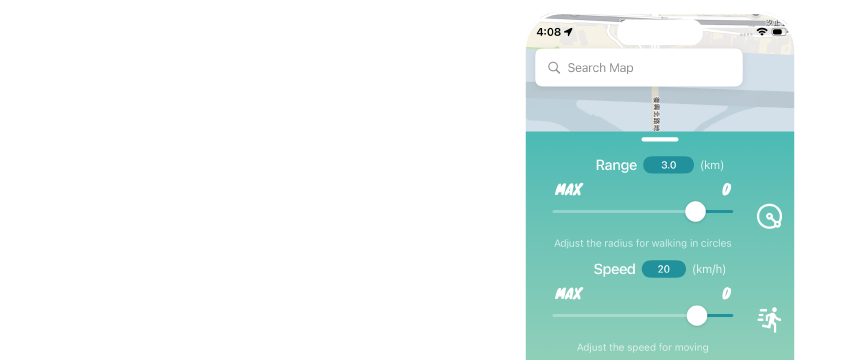
👉 Check your speed settings or zoom in on the map
⚠️ Why this happens:
-
Flymon measures speed in km/h. If the speed is set too low, it may look like you aren't moving at all.
-
By default, speed is set to walking pace. If your map is zoomed out too far (showing an entire city), your movement will appear imperceptible on screen even if you are actively moving.
📊 Recommended Action:
-
Adjust your speed to the recommended range of 10–20 km/h
-
Steps: Flymon Center App > Settings > Speed
-
Zoom in on the map so location changes are easier to see
Issue 3: Unable to "Go To (Walk) / Fly To (Teleport)" Between Points

👉 Check the distance between your destination and current location
⚠️ Why this happens:
- iOS imposes a movement boundary limit, restricting normal spoofed movement to roughly a 15 km radius around your "Real Location." Moving beyond this radius may cause navigation to fail.
📊 Recommended Action:
-
Option 1: Turn on the "Movement Range" feature to display your boundary limit, and stay within this area.
-
Option 2: Use the MEGACOM Firewall app to bypass this restriction.
Steps: Search for and copy destination coordinates > Open Firewall > Paste destination coordinates > Execute "Go To (Walk) / Fly To (Teleport)"
💡 For detailed setup steps, please refer to the MEGACOM Firewall Tutorial.
-
- This prevents iOS from snapping your GPS back to your Real Location and enables smooth long-distance travel and teleportation.